Check the Gmail and Yahoo sender rules first
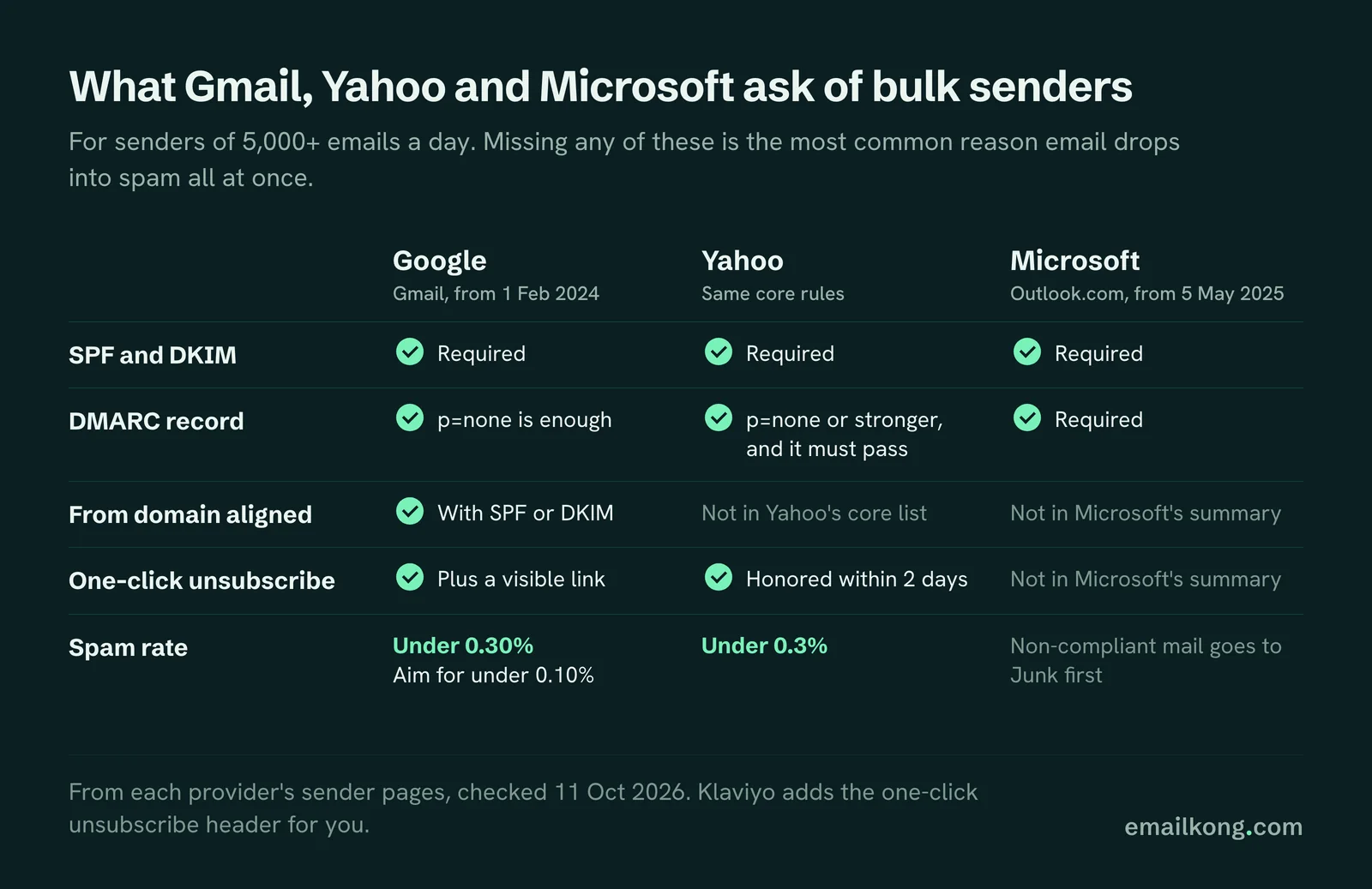
If you send more than 5,000 emails a day to Gmail addresses, Google requires SPF, DKIM, a published DMARC record, alignment between your From domain and your authenticated domain, one-click unsubscribe and a spam rate below 0.30%. Yahoo sets the same core rules. Missing any of these is the most common reason a brand's email drops into spam all at once.
What each provider asks for, from their own sender pages (checked 11 Oct 2026):
- Google: SPF and DKIM, a DMARC record (the policy can be p=none), From domain aligned with SPF or DKIM, one-click unsubscribe plus a visible unsubscribe link, and a spam rate in Postmaster Tools below 0.30%. Google says to aim for under 0.10%. These rules apply to senders of 5,000+ messages a day from 1 February 2024.
- Yahoo: SPF and DKIM, DMARC at p=none or stronger that passes, a working one-click list-unsubscribe header, unsubscribes honored within 2 days, and a spam rate below 0.3%.
- Microsoft (Outlook.com, Hotmail, Live): similar SPF, DKIM and DMARC rules for senders of 5,000+ a day, enforced from 5 May 2025. Microsoft says non-compliant mail goes to the Junk folder first, and that it will be rejected at a later date Microsoft has not announced.
Klaviyo's help center says it adds the one-click unsubscribe code to the header of every email you send, which includes flow emails. Your part is the DNS work and the spam rate.
Set up a branded sending domain and DMARC
A branded sending domain lets Klaviyo send and sign your email as your own domain (for example send.yourbrand.com) instead of a shared Klaviyo domain. It is the step that makes DMARC alignment work, and it is the first thing we check on any account.
How we set it up:
- Add a branded sending domain in Klaviyo on a subdomain you do not use for anything else.
- Add the DNS records Klaviyo gives you at your domain host and wait until Klaviyo shows them as verified.
- Publish a DMARC record on your root domain. Klaviyo cannot do this for you; it lives in your DNS. Start at p=none with a reporting address so you can see who sends as your domain.
- Make sure the From address uses the same root domain as the sending subdomain.
- Move DMARC to p=quarantine once reports show only your real senders (Klaviyo, Shopify, Google Workspace, your helpdesk) are passing.
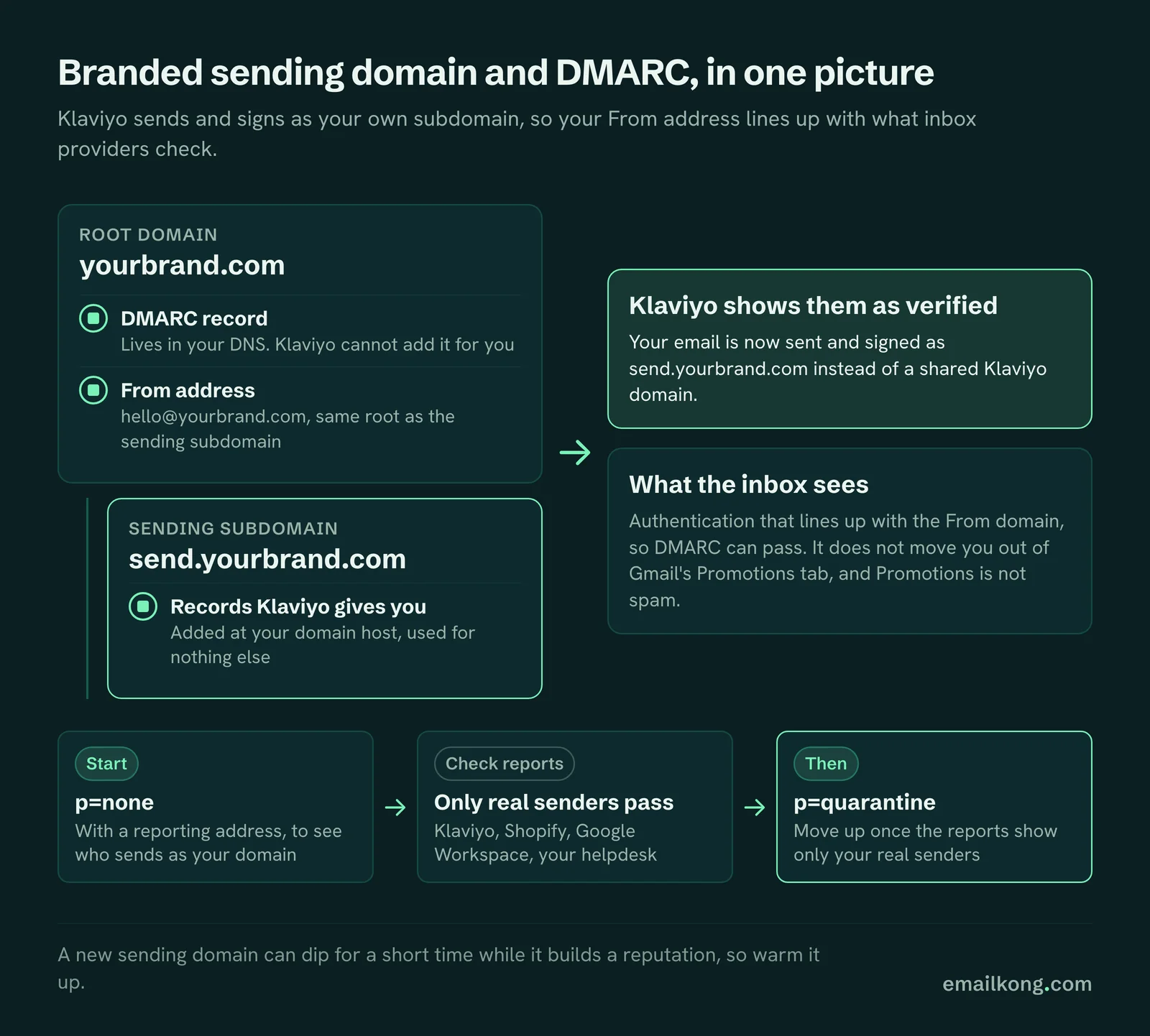
A branded domain on its own does not move you out of Gmail's Promotions tab. Promotions is where Gmail files marketing email, and it is not spam. Brands that start sending from a new domain sometimes see a short dip while the domain builds a reputation, which is why we warm it up.
Send to people who engage, and widen with care
Inbox providers judge you on how people react to your email. If a large share of each send goes to people who have not opened or clicked in months, few people engage, complaints rise as a share of opens, and providers start filtering you. Engagement-based sending fixes this.
On every brand we run, campaigns go to segments built on engagement recency, split into customers and prospects at 3 levels:
- High: recently engaged. Gets every campaign.
- Medium: engaged less recently. Added for promotions and busier weeks.
- Low: the long tail. Only for the biggest days, such as Black Friday or a launch, and only when the account is healthy.
We size the windows per account and change them on a 4-week click trend. When an account's clicks fall, we shorten the windows before we cut the number of sends. Count clicks, not opens, when you build these segments: Apple Mail Privacy Protection opens many emails automatically, so an "opened in the last 90 days" segment includes people who never read anything.
Run a sunset before you suppress
A sunset is the last email someone gets before you stop mailing them. Send it to profiles who have stopped engaging, ask plainly whether they still want to hear from you, and suppress the ones who do not respond.
We write sunset emails as short plain-text notes from a real person at the brand, with a link to confirm. People who click stay. People who ignore it get suppressed by hand, which is reversible, and they stop counting toward your Klaviyo bill. We run this as a periodic campaign to the lowest engagement level rather than an automatic deletion flow, so someone checks the numbers before anyone is removed.
Stop bots and bad sign-ups at the door
Bot sign-ups and fake checkouts create profiles that hard bounce or never engage, and a burst of them can take a healthy account into spam within days. In September 2026 we found bot checkouts on 5 of the accounts we run, all with the same pattern: a single cheap item in the cart, a fake address, almost every email hard bouncing.
What we look for and do:
- Checkout and welcome flows with bounce rates far above normal. The signs are new profiles that started checkout on the cheapest product in the catalog and never ordered.
- A bot segment. Profiles with a single-item checkout on the bot's favorite product, 0 orders, 0 clicks and 0 real opens. We keep them out of sending segments and suppress them.
- Flow filters that skip those checkouts, so the welcome or checkout email never fires.
- Store-side protection. Bot protection or a minimum order value in Shopify is the real fix; Klaviyo filters only limit the damage.
Link scanners are the other trap. Corporate email security tools click every link, and on 1 account we found a browse abandonment flow sending to the same small group of company addresses again and again because each scanner click counted as a product view. A re-entry limit on every abandonment flow and "bot click" excluded from click conditions prevents it.
Warm up a new domain or a cold list
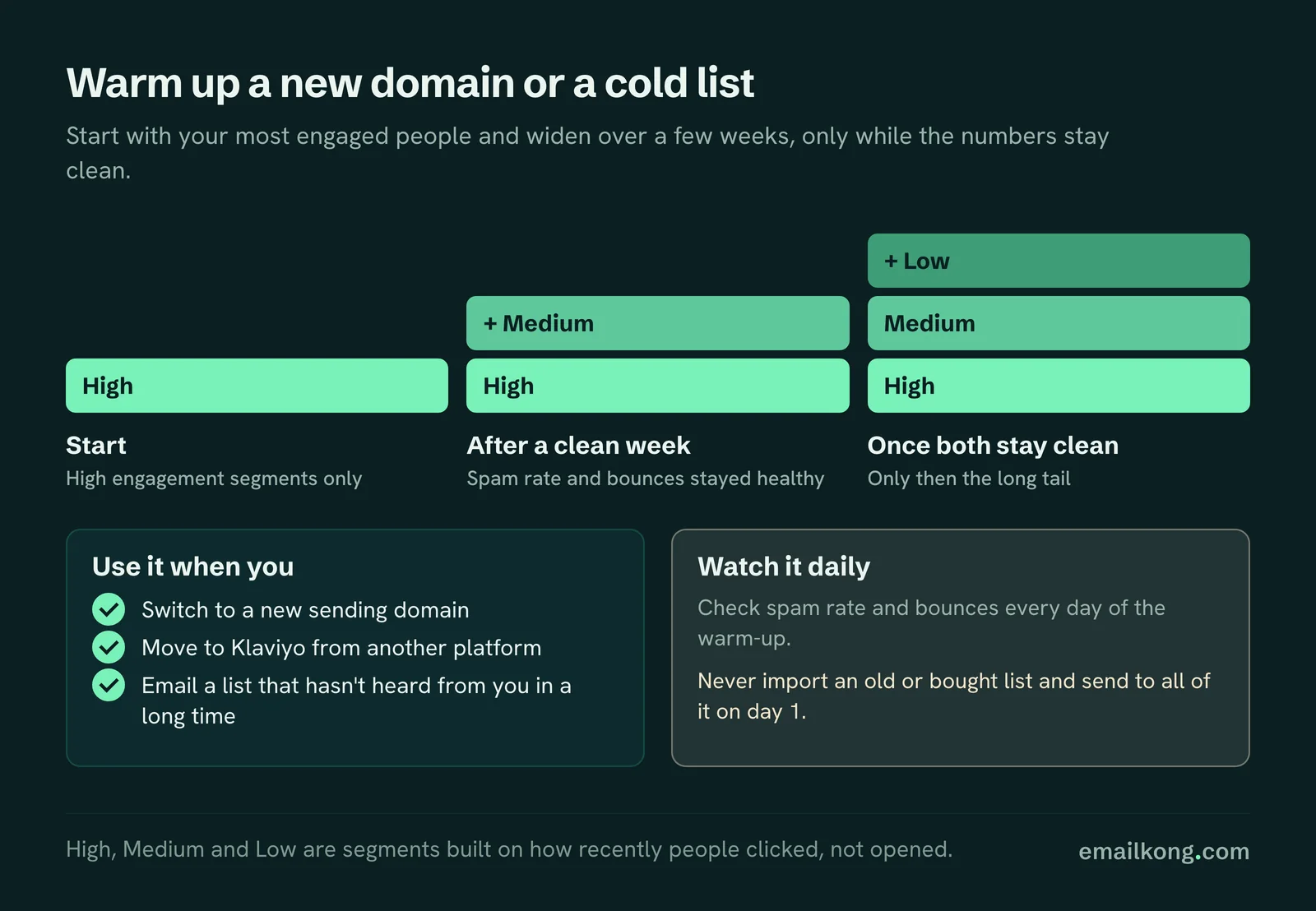
Warming up means starting with your most engaged people and widening over a few weeks. Use it when you switch to a new sending domain, move to Klaviyo from another platform, or start emailing a list that has not heard from you in a long time.
Start with the High segments only, watch spam rate and bounces daily, add Medium after a clean week, and add Low only once both stay clean. Never import an old or bought list and send to all of it on day 1.
Monitor the numbers every week
Google Postmaster Tools is the only place to see your real Gmail spam rate, so set it up for your sending domain. Klaviyo shows bounce, unsubscribe and spam complaint rates per send. These are the thresholds we use when we review accounts:
| Metric (per send) | Healthy | Watch | Act now |
|---|---|---|---|
| Spam complaints (Klaviyo) | Under 0.02% | 0.02-0.05% | Over 0.05% |
| Gmail spam rate (Postmaster Tools) | Under 0.10% | 0.10-0.30% | 0.30% or higher (Google's limit) |
| Bounce rate | Under 0.30% | 0.30-1.0% | Over 1.0% |
| Unsubscribe rate | Under 0.20% | 0.20-0.40% | Over 0.40% |
| Click rate | 2% or more | 1-2% | Under 1% |
If a single send bounces at several percent, pause sends to that segment and find the source before the next one goes out. A sudden drop in clicks across every send, with no change in content, usually means a provider has started filtering you.
EK proof
Email Kong is a Klaviyo Master Platinum Partner, ranked in the top 2.5% of Klaviyo partners worldwide. Over 5 years we have worked with 140+ DTC brands and attributed $59M+ in revenue to Klaviyo for clients, at an average 65.2x ROI. Every brand we run sends through the same engagement-based segments, and we check bounces, complaints and bot activity across all accounts, which is how the September 2026 bot checkouts were caught.