Why this needs setting up
Checkout Champ's Klaviyo plugin does not send declined rebills. Without extra setup, Klaviyo has no idea a renewal failed, so the only message the subscriber gets is Checkout Champ's own autoresponder, if it is on. Getting the events in is covered in subscription events in Klaviyo.
Rebill Decline vs Recycle Failed
Checkout Champ gives you 2 failure moments, and they need different messages.
| Rebill Decline | Recycle Failed | |
|---|---|---|
| When it fires | A rebill is declined | Recycle billing has run out of retries |
| What it means | Checkout Champ will try again | No more automatic retries |
| Fields we use | Decline reason, response type, product, price | Same |
| Tone | Calm. "Your card didn't go through, here's the fix" | Clear. "Your subscription is on hold until you update your card" |
| Button | Update card | Update card |
Recycle billing is Checkout Champ's retry schedule for declined rebills. You set how many times and how often it retries. Recycle billing profiles are set per gateway and apply to every campaign unless you switch them off in that campaign. The Klaviyo flow has to fit inside it. If Checkout Champ retries on day 3 and day 7, your emails should land before those retries, so a new card is on file when the charge runs.
The flow we build
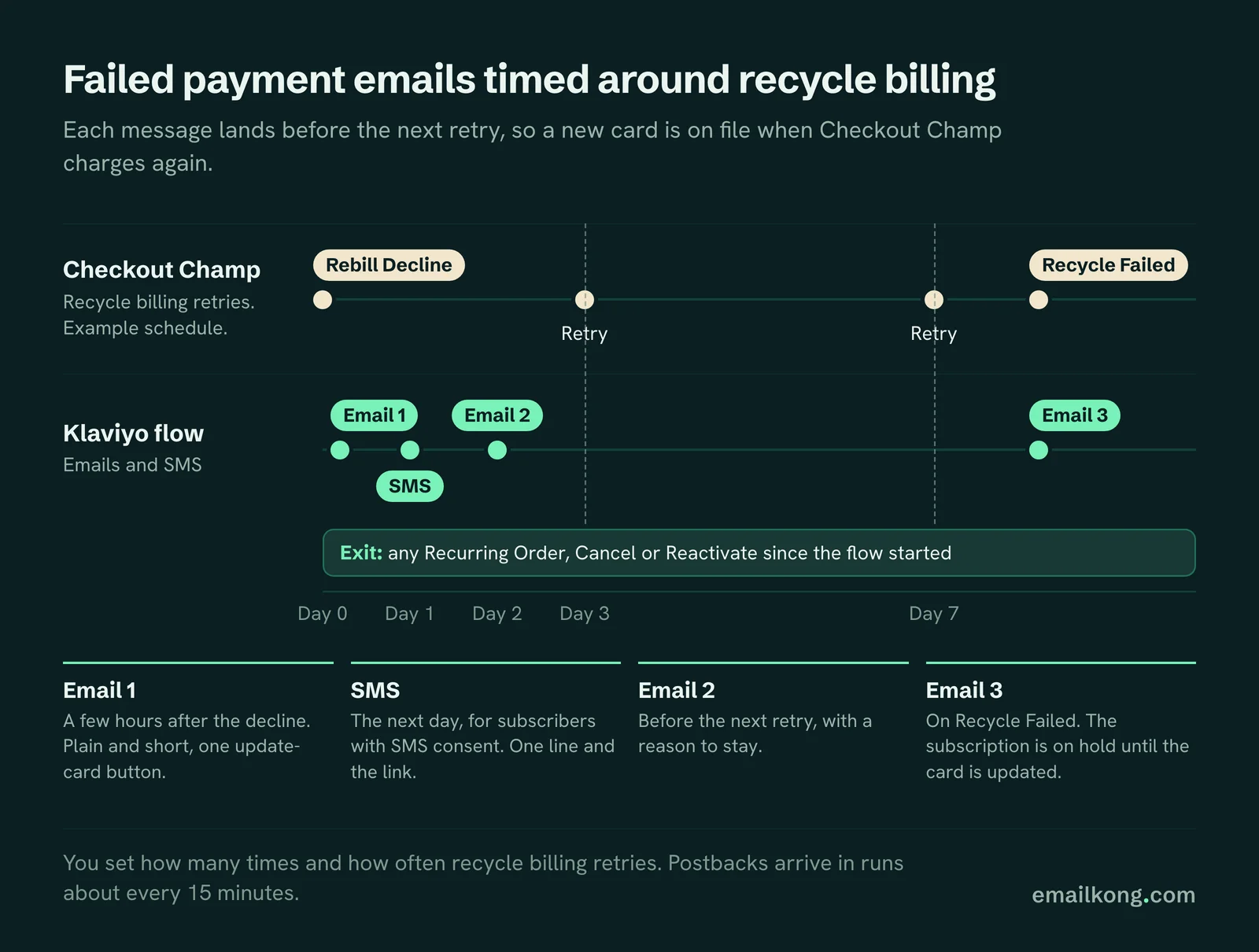
Trigger: Rebill Decline. Exit: any Recurring Order, Cancel or Reactivate since the flow started. Smart Sending: off, so a dunning message isn't skipped because of a campaign the day before.
- Email 1, a few hours after the decline. Plain and short. Name the product, say the card didn't go through, one update-card button.
- SMS, the next day. For subscribers with SMS consent. One line and the update-card link.
- Email 2, before the next retry. A reminder with a reason to stay: what's in the next box, a review, or the results they would lose.
- Email 3, on Recycle Failed. A separate branch or flow. The subscription is on hold. Update the card to restart.
For HolySwish we built it this way: 3 emails and an SMS, with the last email on Recycle Failed.
Write to the decline reason
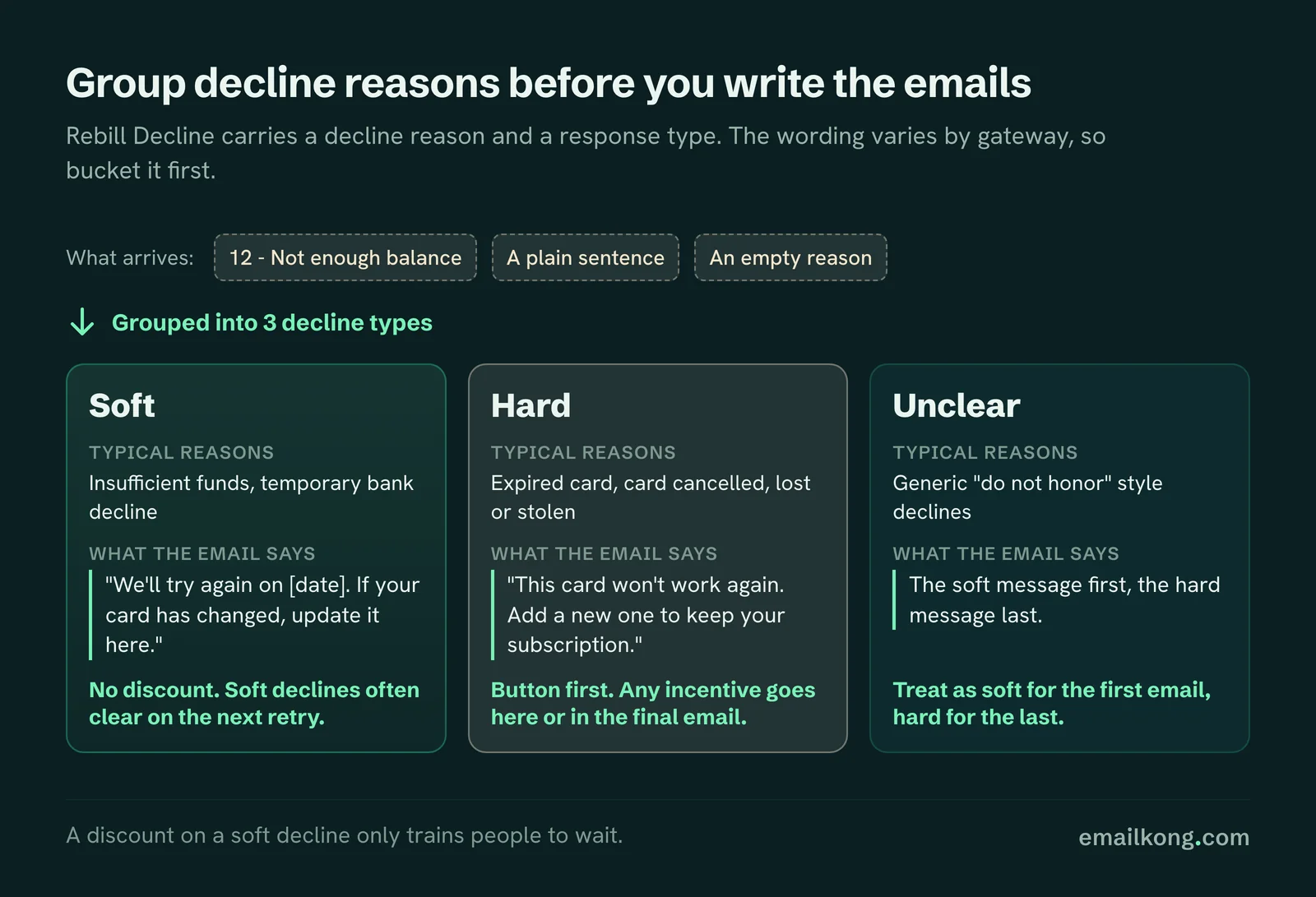
Rebill Decline carries a decline reason and a response type. The decline reason varies by gateway, from a numbered code like "12 - Not enough balance" to a plain sentence, and can be empty, so group reasons before you build branches on them.
| Decline type | Typical reasons | What the email says |
|---|---|---|
| Soft | Insufficient funds, temporary bank decline | "We'll try again on [date]. If your card has changed, update it here." No discount. |
| Hard | Expired card, card cancelled, lost or stolen | "This card won't work again. Add a new one to keep your subscription." Button first. |
| Unclear | Generic "do not honor" style declines | Treat as soft for the first email, hard for the last. |
Soft declines often clear on the next retry. A discount there only trains people to wait. Save any incentive for the hard decline or the final email.
The update-card button
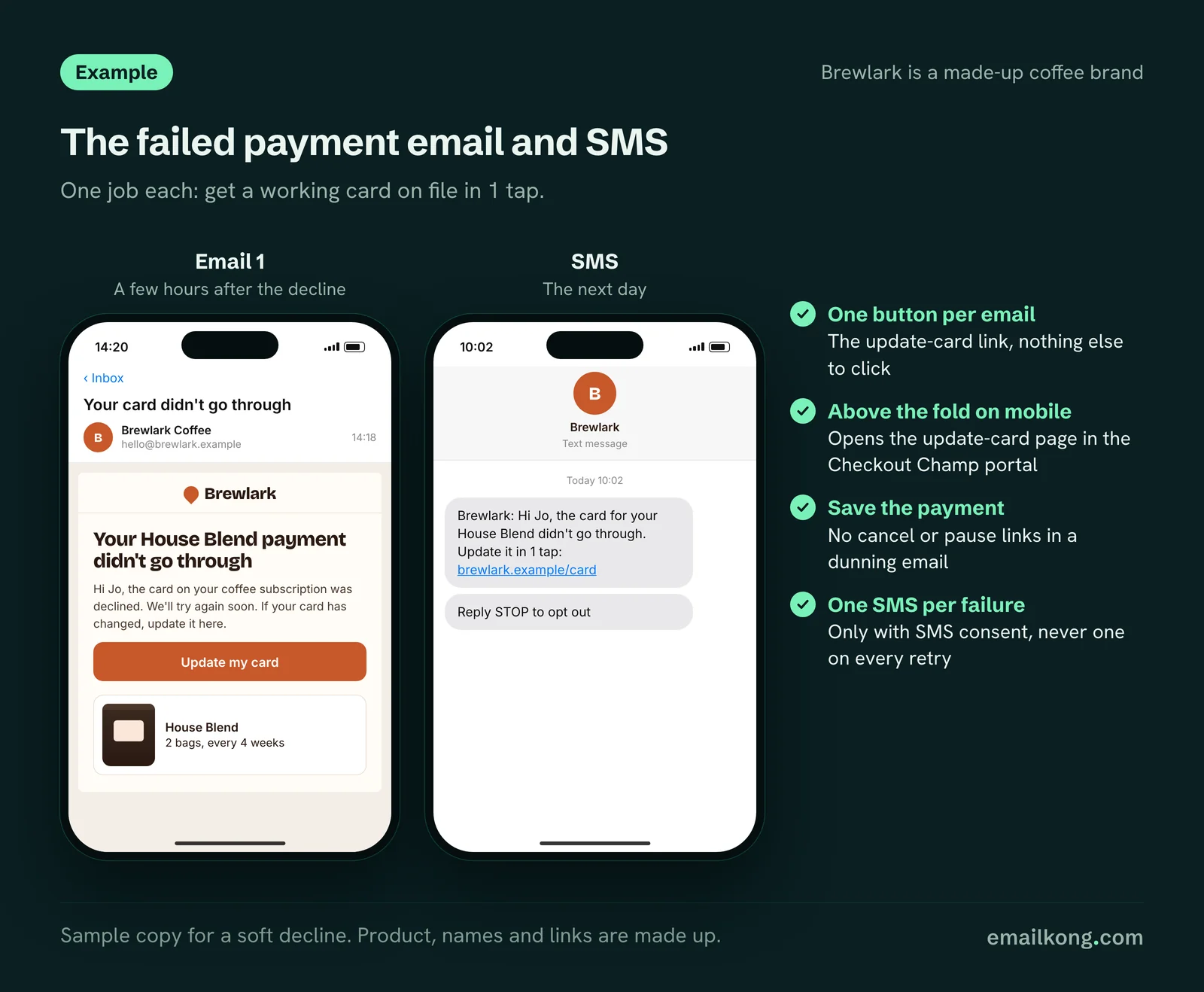
Every failed payment email and SMS has one job: get a working card on file in 1 tap. Our buttons open the update-card page in the customer's Checkout Champ portal, so they don't have to log in and hunt for it.
A few rules we follow:
- One button per email. The update-card link, nothing else to click.
- Put the button above the fold on mobile.
- Don't link "cancel" or "pause" from a dunning email. You are trying to save the payment.
SMS
SMS works well for failed payments because it is read within minutes. You need SMS consent captured at the Checkout Champ checkout and passed to Klaviyo. Keep it to one SMS per failure, and don't send one on every retry.
Remember postbacks arrive in runs about every 15 minutes, so the SMS is never truly instant.
How this fits with Churn Buster and FlexPay
Checkout Champ lists Churn Buster and FlexPay as decline recovery plugins. Churn Buster is a dedicated recovery tool with a Checkout Champ integration covering retries, email and SMS, and card-update links. It is good at what it does.
If you already use it and it works, keep it. Then decide who sends what:
- If Churn Buster sends the recovery emails, Klaviyo doesn't send its own on Rebill Decline. Klaviyo uses the events for segments and suppression instead, so subscribers in recovery don't get "your next box" campaigns.
- If Klaviyo sends the recovery emails, turn off Churn Buster's emails and keep its retry logic, if you want it.
What matters is one sender per message. Two tools emailing about the same declined card looks broken to the customer.
Switch off the Checkout Champ autoresponder
Checkout Champ has a Recurring Order Declined autoresponder and a Card Updated autoresponder. They send through your own email server. Turn them off before the Klaviyo flow goes live, or subscribers get both.
What to measure
- Share of Rebill Declines followed by a Recurring Order within the recycle window.
- Same, split by soft and hard decline.
- Share of Recycle Failed subscribers who update their card later.
- Clicks on the update-card button per email.
The wider playbook for retries and messages is in our failed payment recovery guide. It is written for Loop, but the logic carries over.
Book your free Checkout Champ check
A 20-minute call. We look at what your Checkout Champ sends to Klaviyo, whether rebills reach it, which subscription emails are missing and whether Checkout Champ autoresponders double-send.
Book your free Checkout Champ check
Prefer a written review of your whole Klaviyo account? Get a free Klaviyo audit.