Why it matters on Checkout Champ
Many Checkout Champ brands sell through funnels, with subscribe-and-save offers, trials and upsells. Some buyers don't register that they joined a subscription. When the first rebill lands, they feel tricked. They call their bank, or leave a 1-star review about being charged.
We see this pattern on review sites for subscription brands: the angriest reviews are about a charge the customer didn't expect. A clear reminder before the charge removes the surprise. It also gives people a calm moment to adjust their order, which beats a dispute.
Checkout Champ supports chargeback tools like Midigator and Ethoca as plugins. A reminder works earlier, before there is anything to dispute.
2 ways to trigger it
1. The Pre-Billing postback. Checkout Champ has a Pre-Billing trigger in Postback Export Profiles. Sent into Klaviyo as an event, it can start the reminder flow.
There is a catch. The Pre-Billing postback only fires after Checkout Champ has sent its pre-bill notification, so turn that notification on if you want the postback.
2. A date on the profile. We store each subscriber's next bill date on their Klaviyo profile, and clear it when they cancel or pause. Klaviyo then runs a date-based flow, for example 3 days before the date. When someone cancels, the date disappears and the reminder stops by itself.
We usually run option 2 and treat the postback as a backup. Our subscription events guide explains where the next bill date comes from, since the postback fields don't include it.
What to put in the email
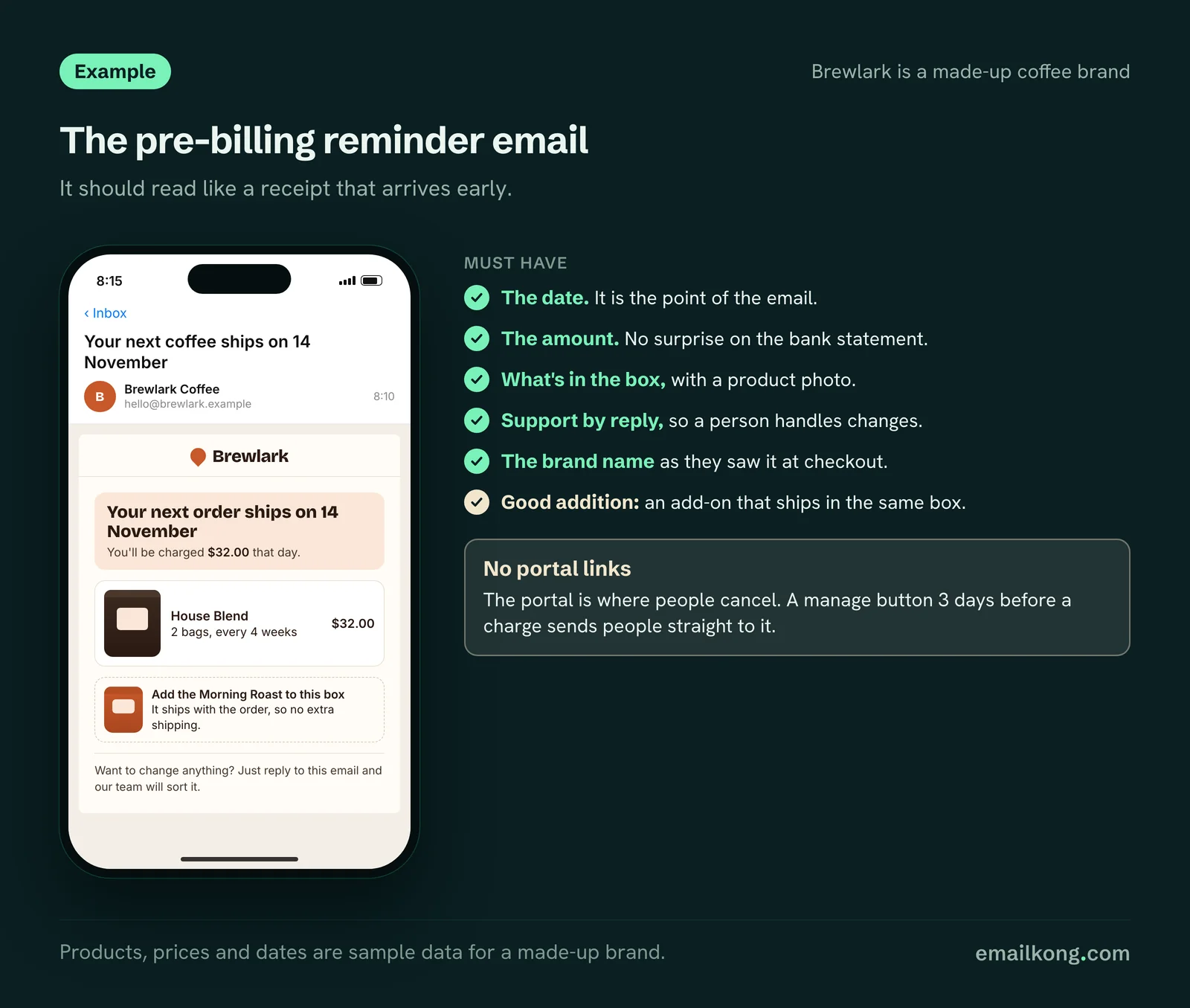
Keep it short and factual. It should read like a receipt that arrives early.
| Must have | Why |
|---|---|
| "Your next order ships on [date]" | The date is the point of the email |
| The amount they will be charged | No surprise on the bank statement |
| What's in the box, with a product photo | They recognise what they bought |
| How to reach support, by replying | A human route for changes |
| The brand name as they saw it at checkout | Statement descriptors and brand names often differ |
Good additions:
- An add-on. "Add the [product] to this box." It ships with the order, so there is no extra shipping. For HolySwish we added a section offering a second product in the same box.
- A use tip. One line on how to get more from the product before the next one arrives.
- A review. Only if it's short.
Why we keep portal links out
We don't put customer portal links in pre-billing emails. The portal is where people cancel. A "manage your subscription" button 3 days before a charge sends people straight to the cancel button at the moment the charge is on their mind.
What we do instead:
- Support handles changes by reply, so a person can offer a pause or a different date.
- The email is clear enough that nobody feels misled, which is what prevents the chargeback.
- Portal buttons stay where they help retention: update card in failed payment emails, resume in paused emails, reactivate in winback emails. Each opens the right page in the customer's Checkout Champ portal.
Some brands want a manage link for compliance reasons. If your legal advice says you need one, add it as a plain text link in the footer, not a button.
Timing
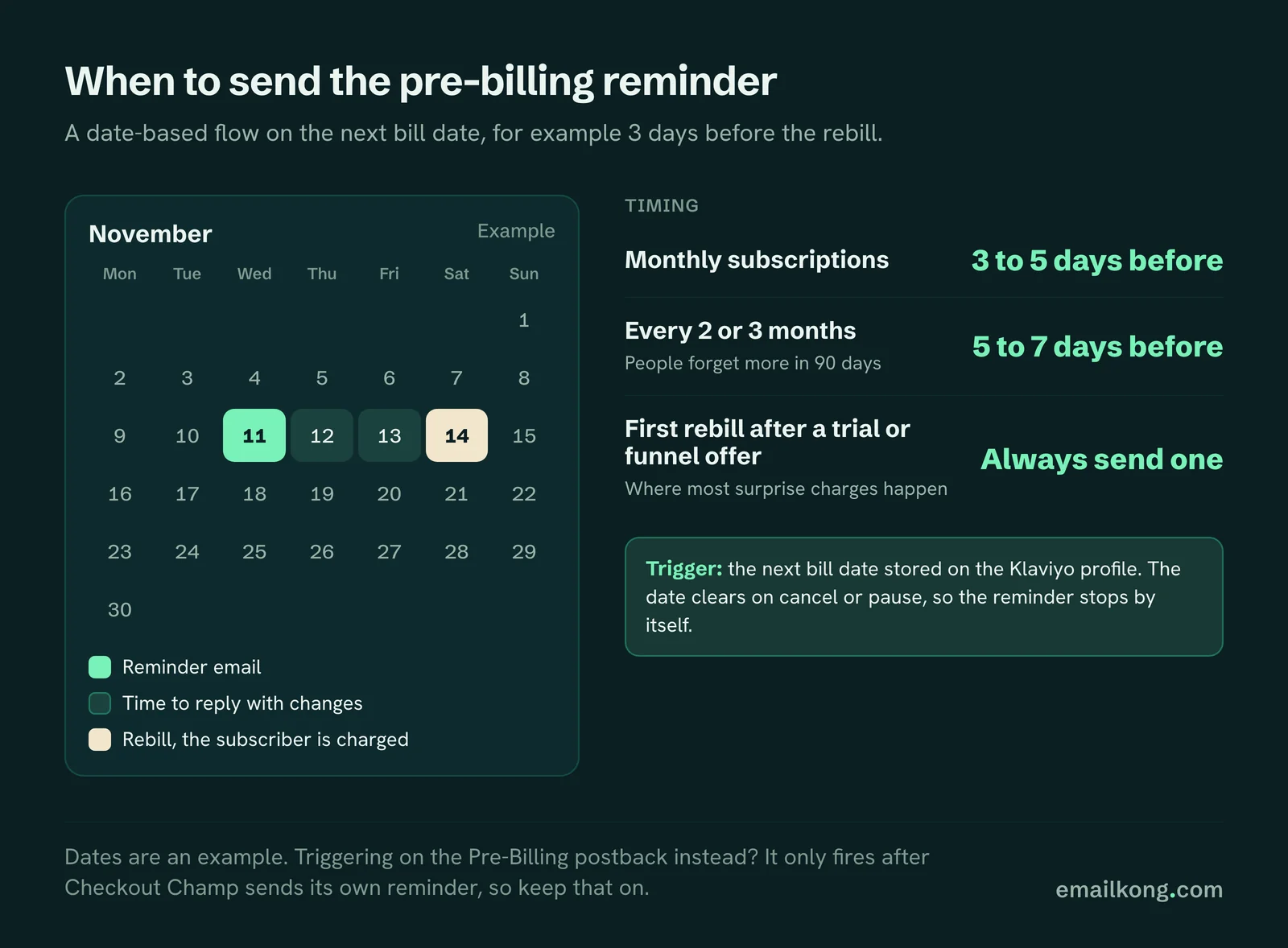
- Monthly subscriptions: 3 to 5 days before the rebill.
- Longer intervals (every 2 or 3 months): 5 to 7 days before. People forget more in 90 days.
- First rebill after a trial or a funnel offer: always send one, even if you skip later reminders. This is where most surprise charges happen.
Switch off the Checkout Champ pre-bill autoresponder
Checkout Champ has its own Pre-Billing autoresponder, sent through your email server. If both run, subscribers get 2 reminders. If the Klaviyo flow runs on the next bill date, turn the autoresponder off once the flow is live and tested. If you use the Pre-Billing postback, the notification has to stay on.
What to measure
- Chargebacks and refund requests on rebills, before and after the reminder goes live.
- Support tickets mentioning "didn't know" or "didn't sign up".
- Add-on revenue from the reminder.
- Cancel rate in the days after the reminder. A small rise is normal. A big one means the email is pushing people to the exit.
Book your free Checkout Champ check
A 20-minute call. We look at what your Checkout Champ sends to Klaviyo, whether rebills reach it, which subscription emails are missing and whether Checkout Champ autoresponders double-send.
Book your free Checkout Champ check
Prefer a written review of your whole Klaviyo account? Get a free Klaviyo audit.