How the native plugin is set up
You connect the plugin in Checkout Champ under Admin, then Plugins, then Email Service Providers, then Klaviyo. It needs a Klaviyo private API key and a phone code. Each Checkout Champ campaign is then routed to a Klaviyo list with "+ Route".
A few settings decide what your Klaviyo data looks like:
- Campaign ID. Scopes the metrics to one Checkout Champ campaign. If you run several brands or offers in one account, this matters.
- Use Subscribe Profiles API. Uses Klaviyo's subscribe endpoint, which respects double opt-in. Phone numbers are not opted in to SMS unless consent is passed with the order.
- Include sales URL. Needed for abandoned checkout emails to link back to the cart.
- Wait And Send Placed Order Event Via Task. Sends Placed Order when the list export runs instead of on the thank-you page.
- Do Not Send toggles. Every event can be switched off on its own.
If you add Klaviyo after your funnels are live, Checkout Champ's docs say the form code needs downloading again.
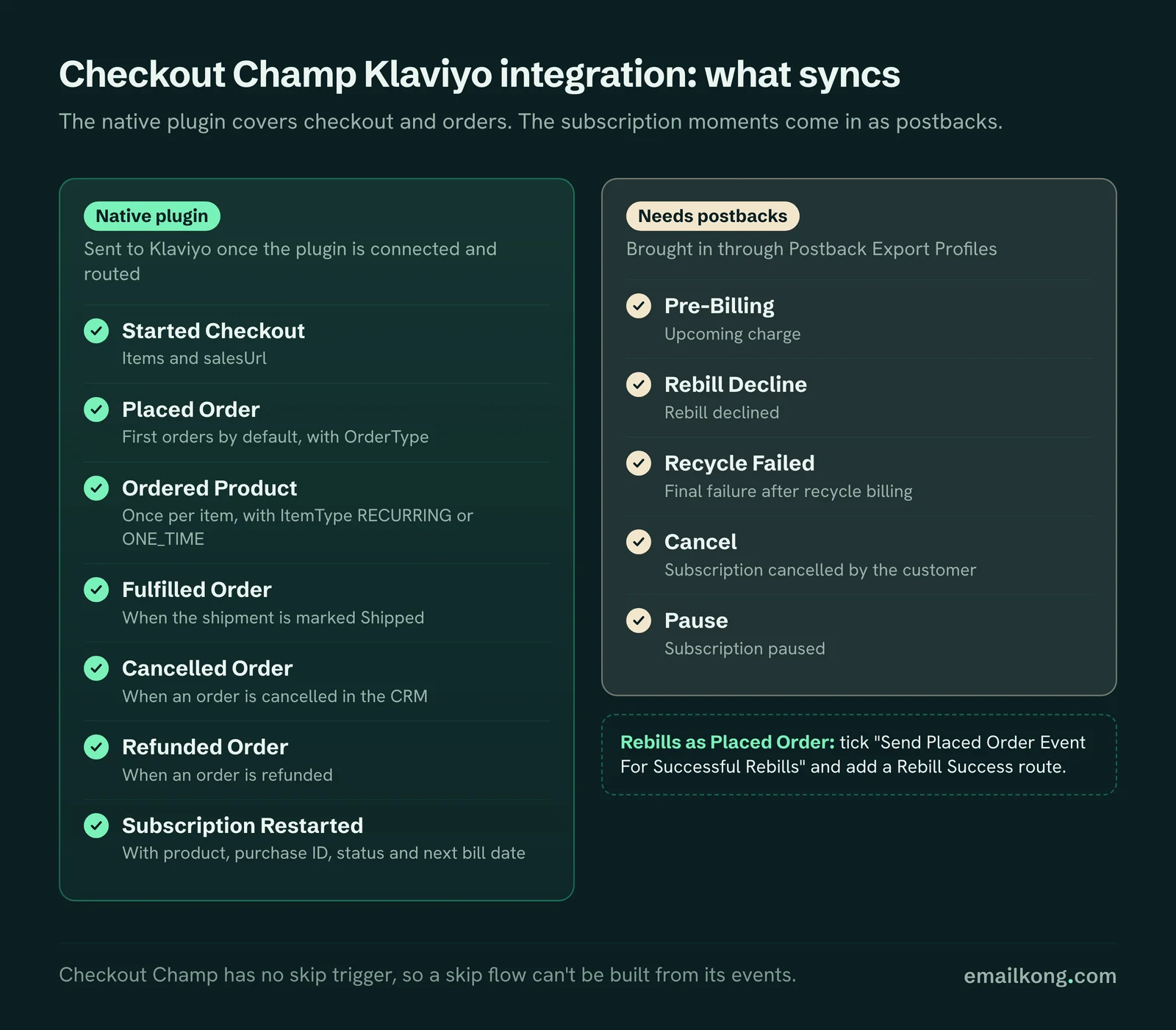
What the plugin sends
| Klaviyo event | When it fires | Useful fields |
|---|---|---|
| Started Checkout | A visitor reaches checkout with items in the cart | items, salesUrl |
| Placed Order | A paid order (first orders by default) | OrderType, order total |
| Ordered Product | Once per item in the order | ItemType (RECURRING or ONE_TIME), PurchaseID, PurchaseStatus, BillingDate |
| Fulfilled Order | The shipment is marked Shipped | order and items |
| Cancelled Order | An order is cancelled in the CRM | order details |
| Refunded Order | An order is refunded | order details |
| Subscription Restarted | A stopped subscription is restarted | product, purchase ID, status, next bill date |
The rebill toggle most accounts have off
Successful rebills do not reach Klaviyo by default. Checkout Champ sends Placed Order for the first sale only until you tick "Send Placed Order Event For Successful Rebills" and create a Rebill Success route for the campaign.
When HolySwish moved to Checkout Champ, every Placed Order in its Klaviyo was a first order. Renewals were happening, but Klaviyo didn't know. That breaks more than reporting:
- Flow and campaign revenue look lower than they are.
- Repeat-buyer segments miss every subscriber.
- Flows that exit on "placed order since starting" never exit for a renewal.
Checkout Champ's own help page recommends turning the toggle on so recovery flows get credit for the revenue they bring back.
NEW_SALE vs rebill orders
Placed Order carries an OrderType field. NEW_SALE means a first order. The plugin labels rebill orders OrderType RECURRING, and rebills only reach Placed Order if you enable the rebill setting in the plugin.
Use it to split your flows:
- Post-purchase and onboarding flows filter on OrderType equals NEW_SALE, so a renewal doesn't restart them.
- Reporting on "first order revenue" vs "renewal revenue" becomes a simple filter.
Ordered Product: the native onboarding trigger
Ordered Product fires once per item. Each item has ItemType, either RECURRING or ONE_TIME. Recurring items also carry PurchaseID, PurchaseStatus and BillingDate.
So you can start a subscriber onboarding flow on Ordered Product where ItemType is RECURRING, without any extra setup. You can also keep one-time buyers in a separate reorder flow. The limit: this only tells you a subscription started. It says nothing about what happens to it after.
Started Checkout payload quirks
In the Checkout Champ accounts we have worked in, Started Checkout is thinner than the Shopify version:
- It has an items list and a salesUrl. There is no currency field and no line_items block like Shopify's.
- Each item has a name, image, price, quantity, product URL, SKU and ItemType.
- If you sell Shipping Protection as an add-on, it arrives as a cart item. Hide it in the abandoned checkout product table, or the email shows "Shipping Protection" as a product.
Build the abandoned checkout template on the Checkout Champ fields. A template copied from a Shopify store will render empty.
What the plugin does not send
| Subscription moment | In the plugin? | Where it lives in Checkout Champ |
|---|---|---|
| Upcoming charge | No | Pre-Billing postback |
| Rebill declined | No | Rebill Decline postback |
| Final failure after recycle billing | No | Recycle Failed postback |
| Subscription cancelled | No. The plugin's Cancelled Order event fires when an order is cancelled in the CRM, not when a customer cancels their subscription | Cancel postback |
| Subscription paused | No | Pause postback |
| Subscription skipped | No | No trigger in Checkout Champ |
Checkout Champ's Postscript plugin does get events like Charge_Failed, Subscription_Cancelled and Subscription_Upcoming_Charge. The Klaviyo plugin does not.
Your options for the missing events
1. Native plugin only. Fine for abandoned checkout, post-purchase and reorder flows. You will have no dunning, cancel or pause flows.
2. Zapier. Zapier has a Checkout Champ and Klaviyo connector. It works for adding customers to lists. It gets harder for lifecycle events: you pay per task, you build one zap per trigger and duplicates need handling by hand.
3. Postbacks into Klaviyo. Checkout Champ's Postback Export Profiles fire on Subscription Started, Pre-Billing, Recurring Order, Rebill Decline, Recycle Failed, Cancel, Pause and Reactivate. They need to be turned into clean Klaviyo events, with retries deduped and missing fields added. This is what we set up for clients. How it works is in getting subscription events into Klaviyo.
Integration checklist
- Plugin connected with a private key that belongs to the right Klaviyo account.
- Every live campaign routed, and nothing routed from another brand's campaign.
- "Send Placed Order Event For Successful Rebills" ticked, with a Rebill Success route.
- Sales URL included, so abandoned checkout links work.
- SMS consent passed at checkout if you send SMS.
- Shipping Protection hidden in checkout emails.
- Postbacks for the subscription events, if you want lifecycle flows.
- Checkout Champ autoresponders reviewed, so they don't double-send with Klaviyo.
If your numbers look wrong after this, our data problems guide covers the usual causes.
Book your free Checkout Champ check
A 20-minute call. We look at what your Checkout Champ sends to Klaviyo, whether rebills reach it, which subscription emails are missing and whether Checkout Champ autoresponders double-send.
Book your free Checkout Champ check
Prefer a written review of your whole Klaviyo account? Get a free Klaviyo audit.